
Trello and Notion Alternatives for No-Code Teams: How Elwis Does It All
Most no-code teams don’t struggle with tools, they struggle with coordination. Ideas live in one place, tasks in another, and the actual app somewhere else entirely. Over time, that fragmentation slows teams down.
This article looks at how planning, documentation, task management, and app building can be brought into a single, coherent workflow inside Elwis. Instead of stitching together multiple tools, teams can keep strategy, execution, and delivery connected without adding process overhead.
Why a unified stack like this works for No-Code Teams
Before combining these tools into a single app, let’s look at what exactly teams need to stay organised while setting up tasks and goals. No-code teams move quickly, often with small teams and limited resources. To stay effective, they need systems that provide structure without slowing them down.
Specifically, no-code teams need:
- Clear task ownership so everyone knows what they’re responsible for
- Clear and organised documentation to avoid constant back-and-forth
- Fast iteration from idea to app so feedback can be applied quickly
Using a lightweight, unified system where everything has a clear place helps teams stay aligned while continuing to ship at speed.
Task Management Built with Elwis
Instead of relying on external tools like Trello, teams can use Elwis to build their own task management system directly inside the platform. This gives teams the same clarity and structure of visual task management while reducing the cost and complexity of adding another app to the stack.
Here is an example of a team management app built using Elwis, Asana:
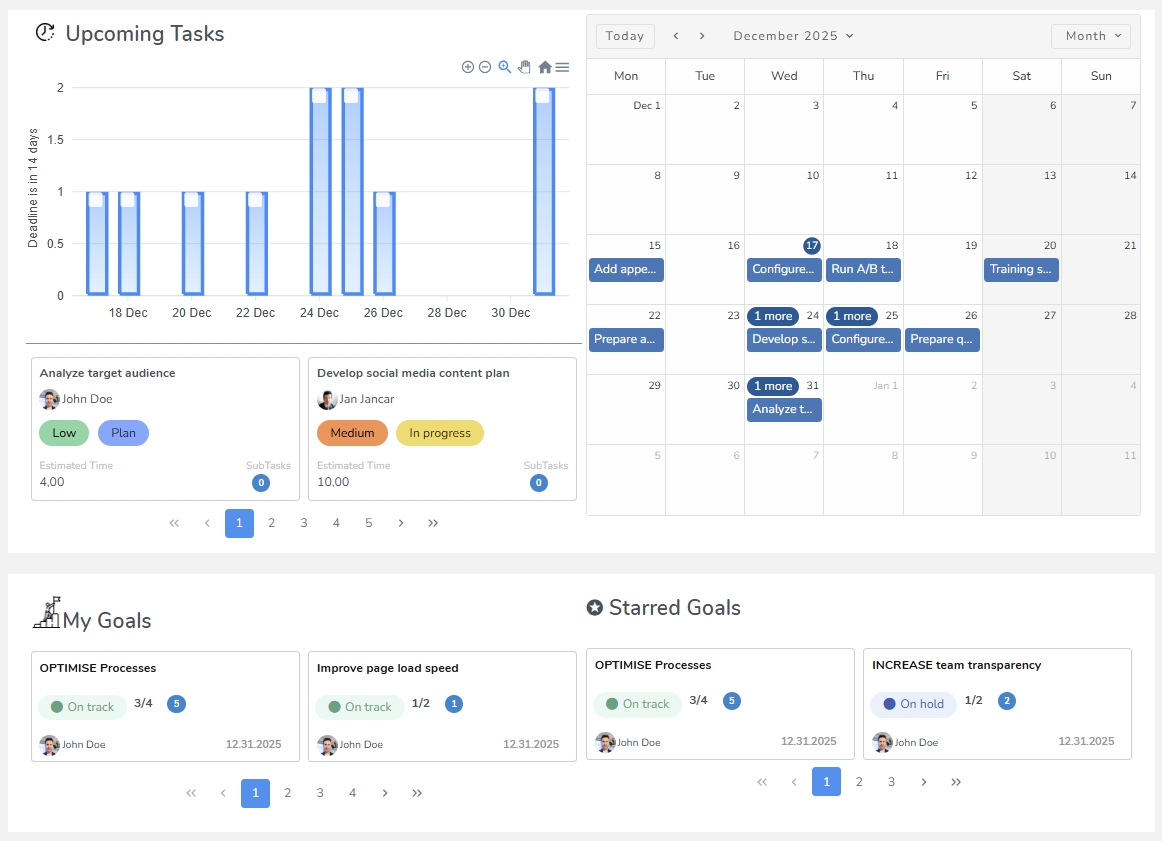
With Elwis, task boards become the execution layer of your workflow, giving everyone real-time visibility into what is being worked on and what is coming next. Because the app is built using the Elwis builder, teams can customize it to match exactly how they work rather than adapting their process to a fixed tool.
Rather than managing work through messages or scattered documents, Elwis provides a shared source for active tasks, ownership, and progress.
How teams use Elwis to build workflows
- Visual task tracking with custom statuses such as Backlog, In Progress, Review, and Done
- Tasks linked directly to documentation, specs, or internal pages created in Elwis
- Custom fields for priority, platform, sprint, or release version
- Team-specific views such as list view, board view, or timeline view
- Permissions and automations tailored to each team’s workflow
Because everything is built inside Elwis, teams can start with a simple task board and gradually add structure as their needs grow. No-code builders can adjust fields, views, and logic without relying on third-party tools or additional subscriptions.
Prototyping and iterating within Elwis
Elwis is where ideas quickly become real, working prototypes. Teams can design, build, and test no-code applications in days instead of weeks, making it easy to explore ideas without overcommitting upfront.
Once a feature or flow is clearly defined, it can be implemented immediately and refined through hands-on testing. This tight feedback loop keeps momentum high and reduces the gap between experimentation and delivery.
How Elwis supports prototyping and iteration:
- Turn early concepts and specs into interactive prototypes
- Rapidly iterate based on internal testing and user feedback
- Collaborate with non-technical teammates in the same workspace
If you want to learn more about this phase, check out our article on how to validate an app idea using Elwis or learn how to test and refine your app concept within Elwis.
With everything in one place, teams can move smoothly from prototype to production:
- Plan – Capture ideas, goals, and rough specs in Elwis
- Prototype – Build and test early versions directly in Elwis
- Iterate – Refine features based on feedback and usage
- Build – Finalize and harden features for release
- Ship – Release updates and gather real-world feedback
Get your app now
Common Mistakes No-Code Teams Make (and How This Stack Helps)
Many no-code teams do not fail because of a lack of capability, they fail because of tool overload. As teams grow, it is easy to keep adding new tools for planning, communication, analytics, automation, and feedback. Each tool solves a small problem, but together they create friction.
This is something we explore in more detail in our tool overload article, where we break down how too many tools can slow teams down, reduce ownership, and make simple workflows harder than they need to be.
A common symptom of tool overload is fragmentation. Documentation lives in one place, tasks are tracked somewhere else, and decisions are buried in chat threads. The result is confusion about what is current, what is approved, and what should be built next.
Instead of adding more tools, this type of application focuses on reducing overlap and strengthening the connections between the tools you already use.
Scaling this workflow as your team grows
One of the advantages of building your workflow in Elwis is that it scales naturally. Early-stage teams can start with a single task board and a handful of documentation pages. As the product grows, structure can be added gradually.
Elwis makes it easy to evolve your workflows as projects become more complex, without introducing new tools or breaking the systems your team already relies on.
.png)


